> For the complete documentation index, see [llms.txt](https://support.senterasensors.com/home/llms.txt). Markdown versions of documentation pages are available by appending `.md` to page URLs; this page is available as [Markdown](https://support.senterasensors.com/home/65r-sensor-user-guide/65r-sensor/installation/inspired-flight/inspired-flight-compatibility-settings/parameter-setup.md).
# Parameter Setup
## Getting Started
IGC v1.3 and greater will has automatic payload detection, parameter application, and video stream settings for 65R. When prompted please apply the payload parameters via IGC.
{% hint style="warning" %}
If you are on IGC v1.2.5 or earlier please see the instructions below.
{% endhint %}
## Parameters
The following parameter changes from the Inspired Flight defaults are required for proper functionality of the 65R. Please see the instructions below.
| Parameter | Value |
| ----------------- | ------------ |
| CAM2\_TYPE | 5 |
| SERIAL4\_PROTOCOL | MAVlink 2 |
| SERIAL4\_BAUD | 115200 |
| SR4\_EXTRA1 | 10 |
| SR4\_EXTRA3 | 2 |
| SR4\_POSITION | 4 |
| SR4\_EXT\_STAT | 10 |
| MNT1\_Type | Gremsy (6) |
| MNT1\_RC\_RATE | 60 deg/s |
| MNT1\_PITCH\_MIN | -90 deg |
| RC6\_OPTION | Mount1 Pitch |
| RC6\_DZ | 20 PWM |
## Parameter Setup Instructions
{% stepper %}
{% step %}
### Power on the Aircraft and Hand Controller
Power the aircraft and hand controller on.
{% endstep %}
{% step %}
### Open IGC
Open IGC and verify the aircraft and hand controller are connected to each other.
{% endstep %}
{% step %}
### Open the Setting Menu
Press the IFT Logo in the upper left hand corner to open the menu.
{% endstep %}
{% step %}
### Select Vehicle Setup
{% endstep %}
{% step %}
### Open the Parameter Menu
Scroll down and select the Parameter menu on the left hand side of the screen.
{% endstep %}
{% step %}
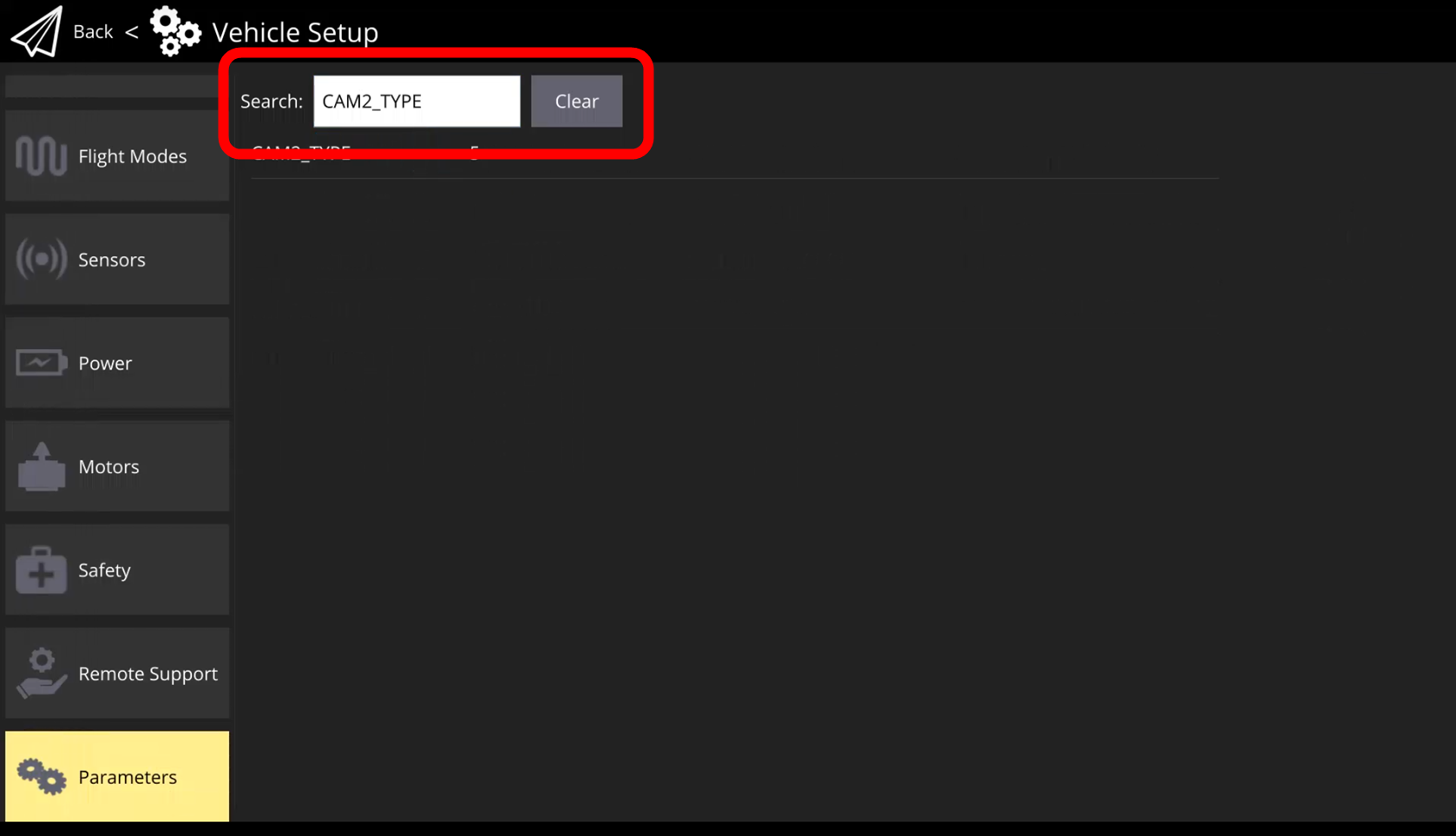
### Search For CAM2\_TYPE
In the search bar at the top of the menu search for "CAM2\_TYPE"
{% endstep %}
{% step %}
### Set CAM2\_TYPE to 5
Tap on the parameter and the parameter editor window will appear.
Set the value to 5 and press Save.
{% endstep %}
{% step %}
### Repeat Steps 6 & 7 For the Parameters Listed In the Table Above
Set all of the listed parameters from the table.
{% endstep %}
{% step %}
### Power Down Aircraft
To apply the changes the aircraft needs to be rebooted. Power the aircraft off.
{% endstep %}
{% step %}
### Install Sensor & Power On Aircraft
Install the 65R and power the aircraft & hand controller on.
{% content-ref url="/pages/LeaZm0e5Q2Smbe5yjI0I" %}
[IF800 Tomcat](/home/65r-sensor-user-guide/65r-sensor/installation/inspired-flight/if800-tomcat.md)
{% endcontent-ref %}
{% content-ref url="/pages/GplavTIwYGre63kgkjVV" %}
[IF1200](/home/65r-sensor-user-guide/65r-sensor/installation/inspired-flight/if1200.md)
{% endcontent-ref %}
{% endstep %}
{% step %}
### Verify Functionality
Allow the aircraft and sensor to fully boot. Once the aircraft has achieved a 3D satellite fix the sensor will start a session and the light on the sensor will turn green.
{% hint style="warning" %}
The aircraft may need to be taken outside to obtain a GPS fix depending on your environment.
{% endhint %}
Other functionalities that can be checked:
* **Gimbal Steering:** Use the rocker wheel on the left side of the controller to change the pitch angle of the gimbal
* **Camera Triggering:** Use the on screen image capture button to test the image capture. The lights on the camera will flash white.
{% hint style="info" %}
IGC v1.4 and greater will enable the use of the physical manual trigger button.
{% endhint %}
{% endstep %}
{% endstepper %}
---
# Agent Instructions
This documentation is published with GitBook. GitBook is the documentation platform designed so that both humans and AI agents can read, navigate, and reason over technical content effectively. Learn more at gitbook.com.
## Querying This Documentation
If you need additional information that is not directly available in this page, you can query the documentation dynamically by asking a question.
Perform an HTTP GET request on the current page URL with the `ask` query parameter, and the optional `goal` query parameter:
```
GET https://support.senterasensors.com/home/65r-sensor-user-guide/65r-sensor/installation/inspired-flight/inspired-flight-compatibility-settings/parameter-setup.md?ask=&goal=
```
`ask` is the immediate question: it should be specific, self-contained, and written in natural language.
`goal` is optional and describes the broader end goal you are ultimately trying to accomplish on behalf of the user. GitBook uses it to tailor the answer towards what is most useful for that goal.
The response will contain a direct answer to the question and relevant excerpts and sources from the documentation.
Use this mechanism when the answer is not explicitly present in the current page, you need clarification or additional context, or you want to retrieve related documentation sections.