> For the complete documentation index, see [llms.txt](https://support.senterasensors.com/home/llms.txt). Markdown versions of documentation pages are available by appending `.md` to page URLs; this page is available as [Markdown](https://support.senterasensors.com/home/fieldagent-web/analytics/tassel-count.md).

# Tassel Count and yield estimate

Count tassels in corn, check the count on each sample photo and estimate yield in bushels per acre.

Count tassels in corn, check the count on each sample photo and estimate yield in bushels per acre. Tassel Count is included in the Advisor and Advanced plans.

The tassels per acre in corn are your ears per acre. Count the kernels on a few sample ears, and FieldAgent [estimates the yield](#estimate-yield).

***

## Fly and order

{% hint style="warning" %}
Tassel count photos are captured with negative overlap. This means the images do not share any area with each other, and they can't be stitched into a mosaic. Don't order a mosaic on a tassel count survey, or it ends up as a [failed order](/home/fieldagent-web/ordering/why-cant-i-order.md#the-order-failed).
{% endhint %}

{% stepper %}
{% step %}

#### Fly the field

Fly once the tassels are out, between VT and R3.

Pick your sensor in **Flight settings for** to see how to fly it, or compare every sensor in the [flight specification](#flight-specification).

{% @sentera-analytics-finder/finder content="audience=support\&view=fly\&product=tassel-count" %}

To plan the flight in FieldAgent Mobile, see its [support site](https://support.senterasensors.com/home/fieldagent-mobile-ios/).
{% endstep %}

{% step %}

#### Import the photos

[Import the photos](/home/fieldagent-web/imagery/import-imagery-in-fieldagent-web.md) into the field.
{% endstep %}

{% step %}

#### Order the count

Open the field and use the Order Analytics button:

<div align="center"><img src="https://2791052504-files.gitbook.io/~/files/v0/b/gitbook-x-prod.appspot.com/o/spaces%2FVt6flh3S4tohPAjrSP91%2Fuploads%2Fgit-blob-b4faf6534b7a4a02e886382cc7d38b5ca2ed2522%2Ffa-web-ui-btn-order-analytics-1x.png?alt=media" alt="ORDER ANALYTICS button"></div>

Choose **Field Scale Tassel Count**, then the survey.

Enter the seeding rate and row spacing. There's no crop type to pick, because the count is for corn. **SUBMIT** becomes clickable once both numbers are filled in.
{% endstep %}
{% endstepper %}

{% hint style="info" %}
FieldAgent emails you when the count is ready. The results are added to the survey as two layers, **Tassel Count** and **Tassel Count Heatmap**.
{% endhint %}

***

## Read the results

Start with **Tassel Count**. It puts a dot on each sample photo, labeled with its tassels per acre and colored from red (lowest) to green (highest).

1. In **Map Layers**, click the layers icon <img src="https://2791052504-files.gitbook.io/~/files/v0/b/gitbook-x-prod.appspot.com/o/spaces%2FVt6flh3S4tohPAjrSP91%2Fuploads%2Fgit-blob-63327f0a1a9668fc0304dc7f1979ade39d585d00%2Ffa-web-icon-layers.svg?alt=media" alt="layers icon" data-size="line">.
2. Under the survey date, turn on **Tassel Count**.
3. Click the layer name to open **Tassel Count Details**.
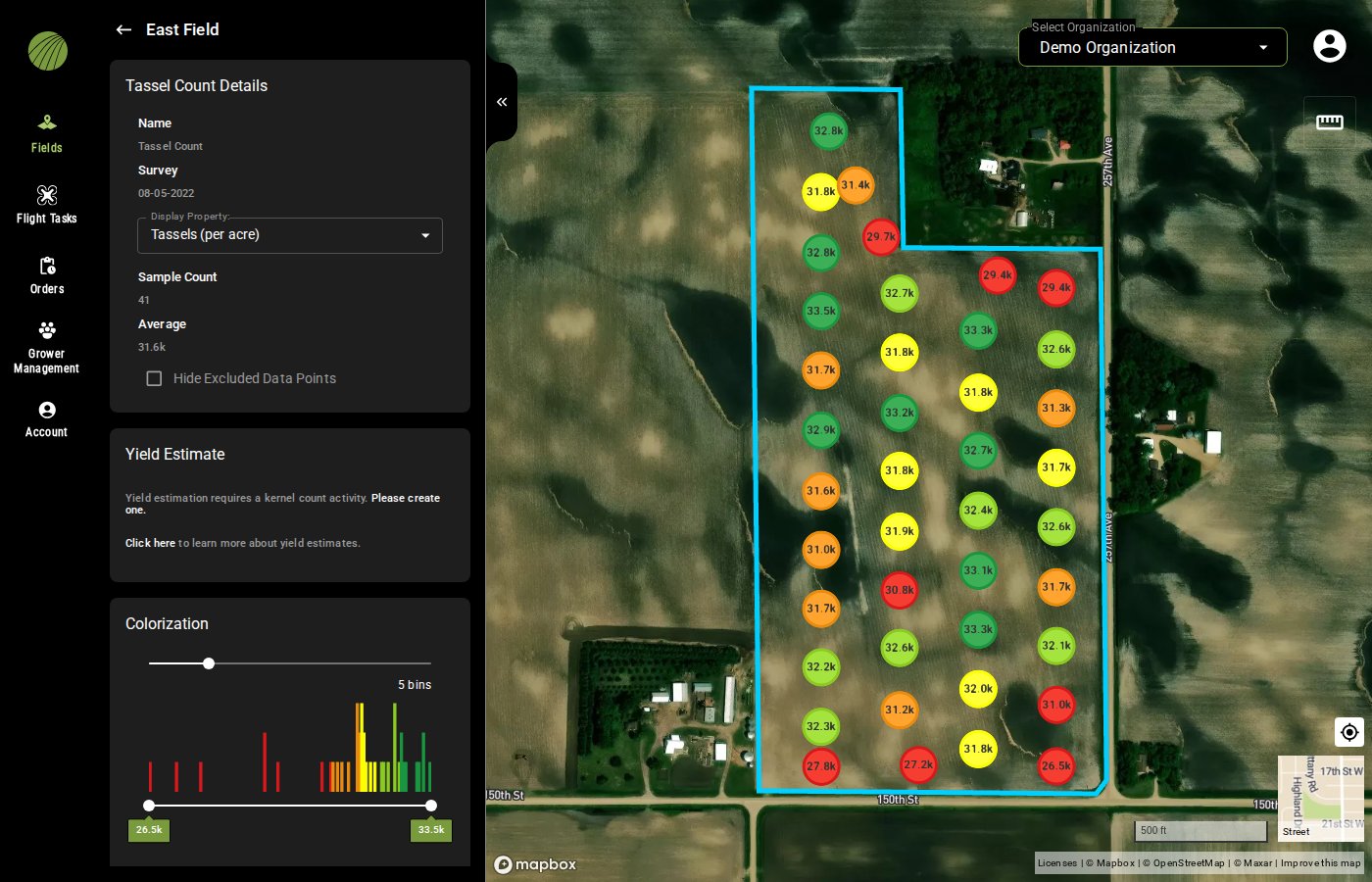
<figure><img src="https://2791052504-files.gitbook.io/~/files/v0/b/gitbook-x-prod.appspot.com/o/spaces%2FVt6flh3S4tohPAjrSP91%2Fuploads%2Fgit-blob-271a666213f01b76583cf3b062bff7b51547b5d7%2Ffa-web-tassel-count-layer.jpg?alt=media" alt="The Tassel Count layer: colored dots labeled with tassels per acre across the field, the Tassel Count Details panel with Display Property Tassels (per acre), Sample Count 41 and Average 31.6k, the Yield Estimate section asking for a kernel count activity, and the Colorization controls"><figcaption><p>No kernel count has been entered yet, so there's no yield estimate.</p></figcaption></figure>

To see tassels per acre across the whole field, turn on **Tassel Count Heatmap** from the same survey.

<details>

<summary>Everything in the layer details</summary>

| Item                             | Description                                                                                                                                                                                 |
| -------------------------------- | ------------------------------------------------------------------------------------------------------------------------------------------------------------------------------------------- |
| **Display Property**             | The value on the dots: **Tassels (per acre)**, or **Tassels (per image)** for the raw count in each photo.                                                                                  |
| **Sample Count** and **Average** | How many photos were counted, and the mean of the samples you haven't excluded.                                                                                                             |
| **Hide Excluded Data Points**    | Hides the samples you excluded in the image viewer.                                                                                                                                         |
| **Yield Estimate**               | The estimated bushels per acre, once the field has a [kernel count](#estimate-yield).                                                                                                       |
| **Colorization**, **Opacity**    | How the dots are colored and how see-through the layer is. [Colorization and visualization](/home/fieldagent-web/view-and-analyze/colorization-and-visualization.md) explains each setting. |
| **Zone Statistics**              | The minimum, average and maximum tassels per acre for the field boundary and each zone.                                                                                                     |
| **Download Files**               | The samples as GeoJSON, CSV or Shapefile.                                                                                                                                                   |

</details>

### Try it in the demo

The demo below has a corn field counted after tasseling from 41 sample photos. Turn on **Tassel Count**, switch its details between tassels per acre and per photo, then add the heatmap.

{% @fieldagent-demo/embed content="tassel-count" %}

<a href="https://senterallc.github.io/FieldAgent-Demos/demo.html?s=tassel-count&#x26;mode=page" class="button secondary">Open this demo full size</a>

***

## Check a sample

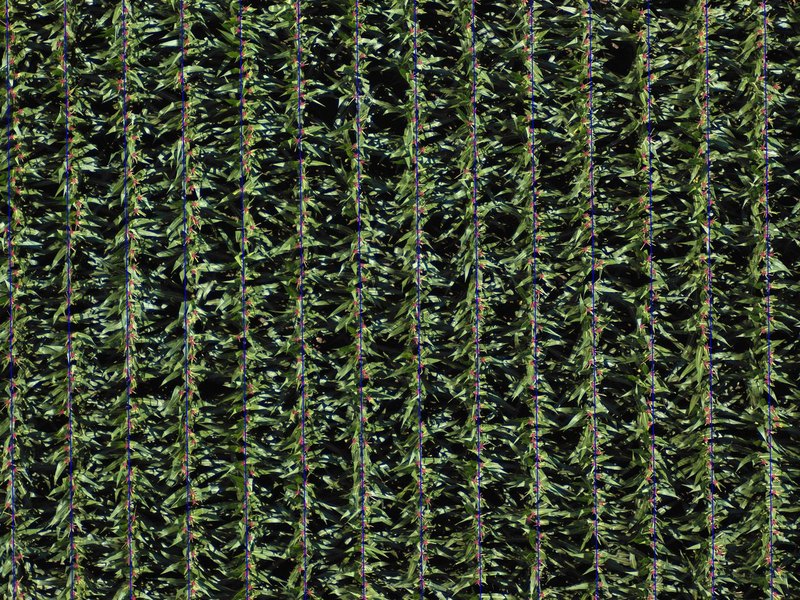
Click a dot to open its photo in the [image viewer](/home/fieldagent-web/view-and-analyze/photo-dots-and-image-viewer.md). The annotated view marks the rows FieldAgent found and every tassel it counted. **Count Details** gives the **Tassels Detected** per acre and the row spacing for that photo.

<figure><img src="https://2791052504-files.gitbook.io/~/files/v0/b/gitbook-x-prod.appspot.com/o/spaces%2FVt6flh3S4tohPAjrSP91%2Fuploads%2Fgit-blob-ee651c14c78d6ccffcbd0f1e81b8086f35b47826%2Ffa-web-photo-tassel-annotation.jpg?alt=media" alt="A tassel count sample photo annotated: a blue line along each corn row and a small red mark on every tassel counted"><figcaption></figcaption></figure>

To check the count yourself, use the blue validator box, which covers 1/1000 of an acre. Line it up with a row, set its width to the row spacing and count the tassels inside it. Multiply by 1,000 and compare your number with **Tassels Detected**. The **Validator Box Instructions** next to the photo show how to rotate and resize the box.

If a photo landed on an end row or a waterway, turn on **Exclude Point** to leave it out of the average. **Hide Excluded Data Points** in the layer details then takes it off the map.

### Try it in the demo

Check a low sample with the validator box in the demo below, then exclude it.

{% @fieldagent-demo/embed content="tassel-count-check" %}

<a href="https://senterallc.github.io/FieldAgent-Demos/demo.html?s=tassel-count-check&#x26;mode=page" class="button secondary">Open this demo full size</a>

***

## Estimate yield

For bushels per acre, FieldAgent also needs the kernels per ear, which you count by hand.

{% stepper %}
{% step %}

#### Count kernels in the field

Pick at least three ears that represent the field. On each ear, count the kernel rows and the kernels in one row.
{% endstep %}

{% step %}

#### Record a Kernel Count activity

Open the field and click the plus icon <img src="https://2791052504-files.gitbook.io/~/files/v0/b/gitbook-x-prod.appspot.com/o/spaces%2FVt6flh3S4tohPAjrSP91%2Fuploads%2Fgit-blob-93fc4d9f6268e89a5a848974a80ca6a3ffd199a5%2Ffa-web-icon-add.svg?alt=media" alt="add icon" data-size="line"> in **Field Activities**. Choose the field's crop season, then the **Kernel Count** activity type. If the field has no crop season yet, [add one](/home/fieldagent-web/fields/crop-seasons-and-field-activities.md) first.

Enter the date. Enter the first ear's **Kernel Rows** and **Kernels/Row**. For each other ear, click **ADD ANOTHER EAR** and enter its counts. Then click **SUBMIT**.
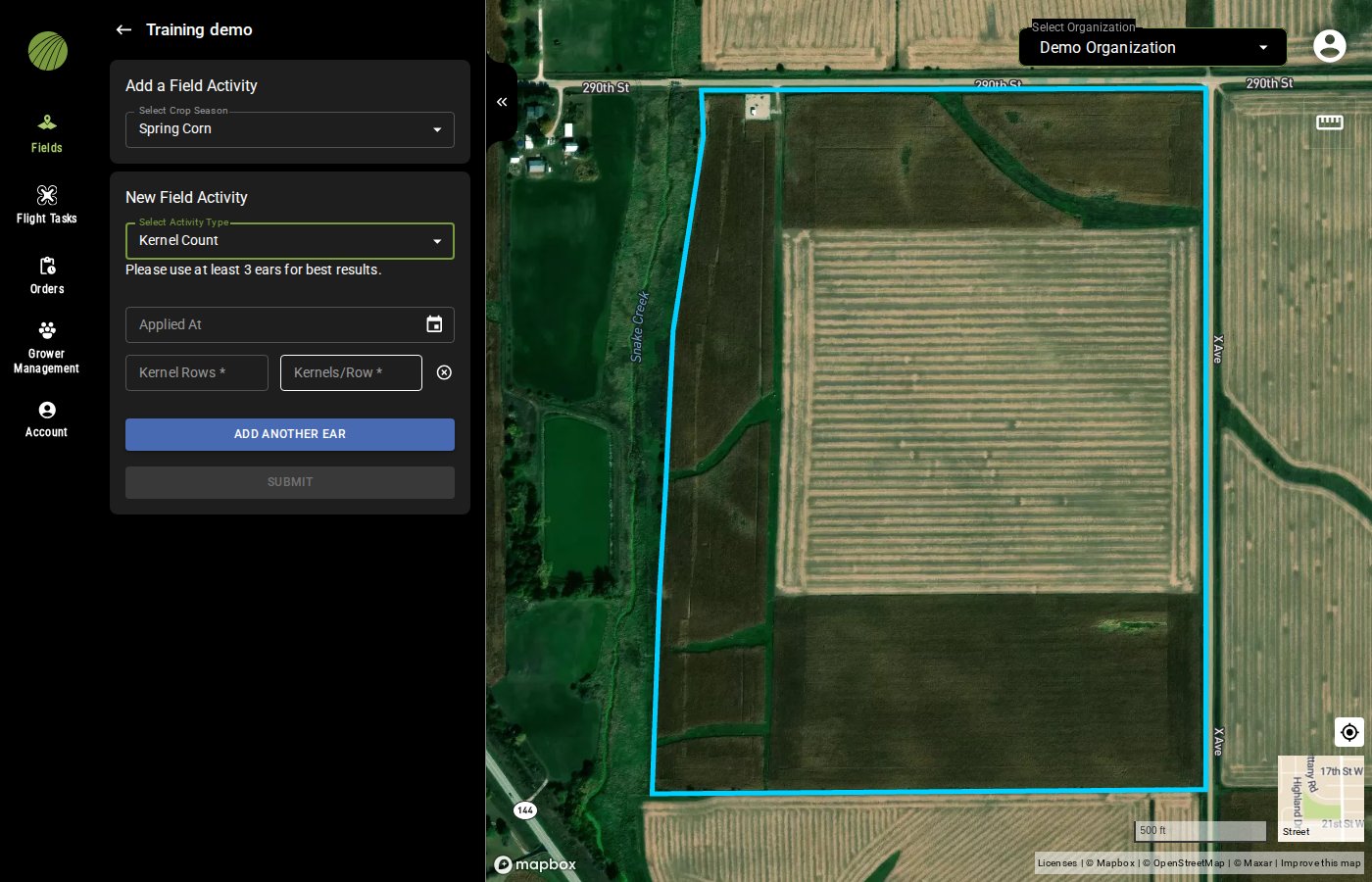
<figure><img src="https://2791052504-files.gitbook.io/~/files/v0/b/gitbook-x-prod.appspot.com/o/spaces%2FVt6flh3S4tohPAjrSP91%2Fuploads%2Fgit-blob-78ead727190b238584caa6702ac62c42e71bee3b%2Ffa-web-kernel-count-activity.jpg?alt=media" alt="The New Field Activity form with Kernel Count selected, an Applied At date, Kernel Rows and Kernels/Row fields for one ear, and the ADD ANOTHER EAR button"><figcaption><p>More ears give a steadier estimate.</p></figcaption></figure>
{% endstep %}

{% step %}

#### Choose it in Yield Estimate

Open the **Tassel Count** layer details again. In **Yield Estimate**, choose the kernel count, and the estimated bushels per acre appear.
{% endstep %}
{% endstepper %}

The estimate combines the tassels per acre with the average kernels per ear you entered, so it's only as good as the ears you sampled. Enter a new kernel count later in the season if the ears fill differently than you expected.

### Try it in the demo

Record a kernel count of three ears in the demo below, then choose it in **Yield Estimate**. **Show me** plays each step for you.

{% @fieldagent-demo/embed content="tassel-yield" %}

<a href="https://senterallc.github.io/FieldAgent-Demos/demo.html?s=tassel-yield&#x26;mode=page" class="button secondary">Open this demo full size</a>

***

## Compare areas of the field

To compare hybrids or treatment strips, [draw a zone](/home/fieldagent-web/view-and-analyze/zones-and-zone-statistics.md) over each one. Then compare their averages in **Zone Statistics**.

***

## Use the results

* If the field was imported from Operations Center and **Send Map Layers to Field Analyzer** is on, the heatmap appears in the field's [Field Analyzer](/home/fieldagent-web/integrations/fieldagent-and-operations-center.md) when the count completes.
* Turn the **Tassel Count Heatmap** into a prescription with [Zone Rx (Beta)](/home/fieldagent-web/export-and-share/zone-rx-prescriptions.md).
* Download the samples as GeoJSON, CSV or Shapefile from **Download Files** in the layer details.
* [Create a report](/home/fieldagent-web/export-and-share/create-a-report.md) to share the layer as a PDF.

***

## Flight specification

Pick your sensor in **Settings for** to see how to fly it.

{% @sentera-analytics-finder/finder content="audience=support\&view=spec\&product=tassel-count" %}

***

## Related pages

{% content-ref url="/pages/dhtWGcJNstJFZXvnKym1" %}
[Order analytics](/home/fieldagent-web/ordering/order-analytics.md)
{% endcontent-ref %}

{% content-ref url="/pages/y5cYSFUW0AytrGKslf0c" %}
[Stand Count](/home/fieldagent-web/analytics/stand-count.md)
{% endcontent-ref %}

{% content-ref url="/pages/A0kq5ezKYqGhNfAwwUWD" %}
[Crop seasons and field activities](/home/fieldagent-web/fields/crop-seasons-and-field-activities.md)
{% endcontent-ref %}

{% content-ref url="/pages/NbXwipivNBx5sLB8YHDx" %}
[Download and export data](/home/fieldagent-web/export-and-share/download-and-export-data.md)
{% endcontent-ref %}


---

# Agent Instructions
This documentation is published with GitBook. GitBook is the documentation platform designed so that both humans and AI agents can read, navigate, and reason over technical content effectively. Learn more at gitbook.com.

## Querying This Documentation
If you need additional information that is not directly available in this page, you can query the documentation by asking a question.

Perform an HTTP GET request on the following URL with the `ask` and `goal` query parameters:

```
GET https://support.senterasensors.com/home/fieldagent-web/analytics/tassel-count.md?ask=<question>&goal=<user_goal>
```

`ask` is the immediate question: it should be specific, self-contained, and written in natural language.
`goal` is what the user is ultimately trying to achieve, the reason they need the answer. Sharing it helps GitBook give you a better, more relevant answer. A goal is most helpful when it describes the outcome the user wants rather than restating the question. For example, with `ask=how do I create an API token`, a goal like `automate deployments from our CI pipeline` lets GitBook tailor the answer to that use case.

The response will contain a direct answer to the question and relevant excerpts and sources from the documentation.

Use this mechanism when the answer is not explicitly present in the current page, you need clarification or additional context, or you want to retrieve related documentation sections.