
 opens the [account menu](/home/fieldagent-web/get-started/sign-in-and-account-menu.md). The menu shows your name and email address, and these options:
* **Manage Account** opens the FieldAgent administration site, admin.sentera.com, in a new tab.
* **Change Password** opens the change your password page of the administration site in a new tab.
* **Help** opens Sentera's support site in a new tab.
* **Sign Out** ends your session.
***
## Fields list
The **Fields** list shows the fields in your selected organization. Click a field name to open the field and show its boundary on the map.
opens the [account menu](/home/fieldagent-web/get-started/sign-in-and-account-menu.md). The menu shows your name and email address, and these options:
* **Manage Account** opens the FieldAgent administration site, admin.sentera.com, in a new tab.
* **Change Password** opens the change your password page of the administration site in a new tab.
* **Help** opens Sentera's support site in a new tab.
* **Sign Out** ends your session.
***
## Fields list
The **Fields** list shows the fields in your selected organization. Click a field name to open the field and show its boundary on the map.
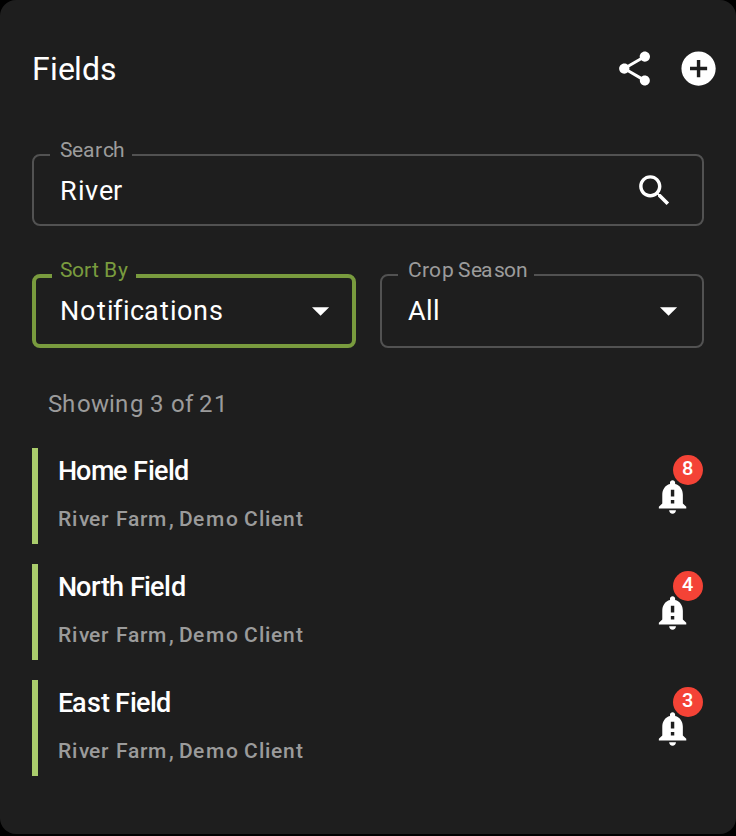
Searched for River and sorted by notifications
 at the end of a row means the field has unread notifications.
{% hint style="info" %}
To find a field in a long list, use the filters at the top:
* **Search** matches the field name, address, farm or grower.
* **Sort By** orders the list by active crop season, notifications, grower, farm or field name.
* **Crop Season** narrows the list to one season.
{% endhint %}
***
## Map
* The ruler icon
at the end of a row means the field has unread notifications.
{% hint style="info" %}
To find a field in a long list, use the filters at the top:
* **Search** matches the field name, address, farm or grower.
* **Sort By** orders the list by active crop season, notifications, grower, farm or field name.
* **Crop Season** narrows the list to one season.
{% endhint %}
***
## Map
* The ruler icon  [measures a distance or an area](/home/fieldagent-web/view-and-analyze/measure-a-distance-or-an-area.md). It appears once you open a field.
* The target icon
[measures a distance or an area](/home/fieldagent-web/view-and-analyze/measure-a-distance-or-an-area.md). It appears once you open a field.
* The target icon  recenters the map on your location.
* The thumbnail switches the basemap between **Street** and satellite imagery. Its label shows the basemap you'll switch to.
* The double chevron
recenters the map on your location.
* The thumbnail switches the basemap between **Street** and satellite imagery. Its label shows the basemap you'll switch to.
* The double chevron  hides the panel so the map uses the full width. Click it again to bring the panel back.
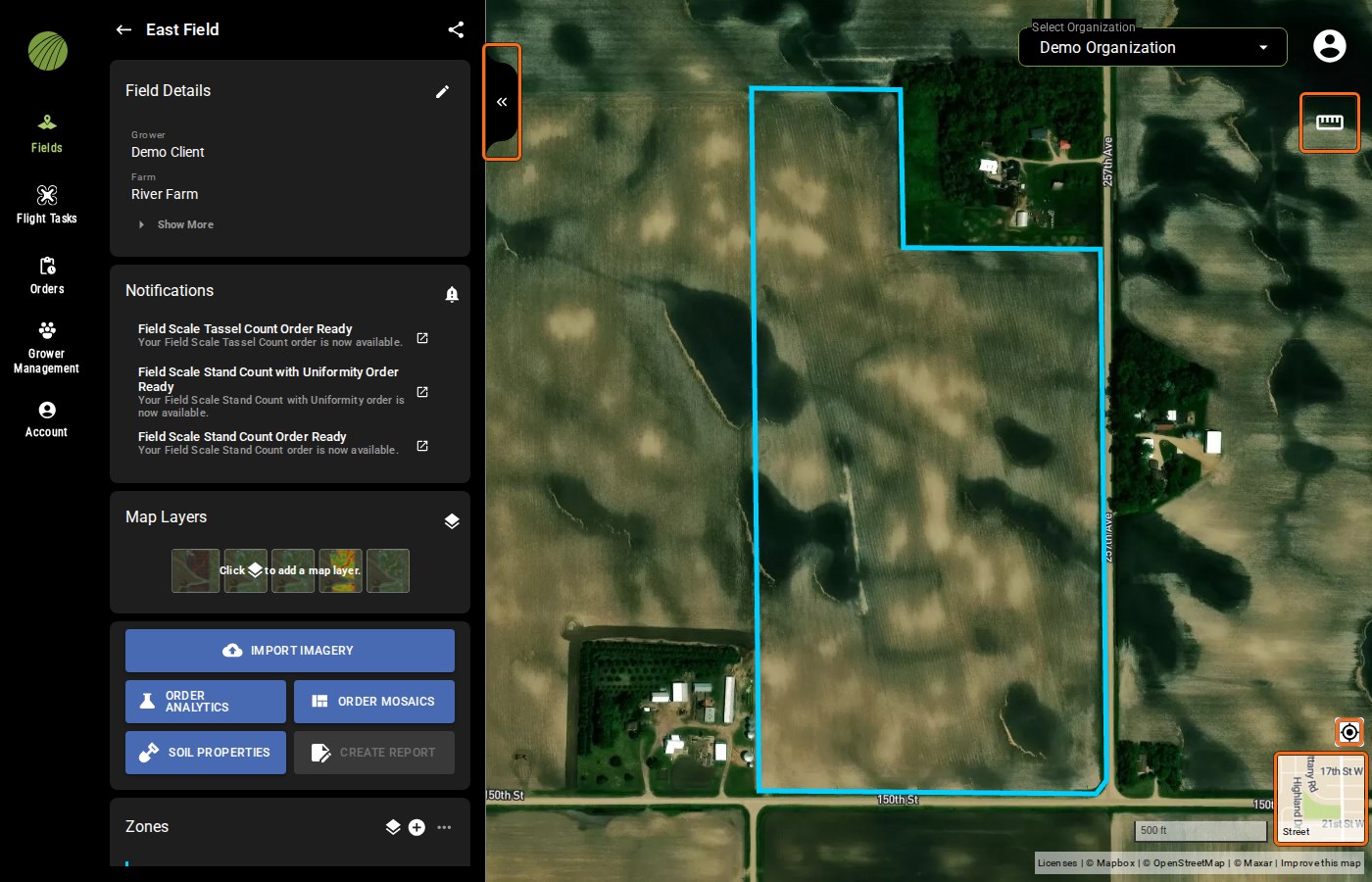
Ruler, target, thumbnail and double chevron highlighted
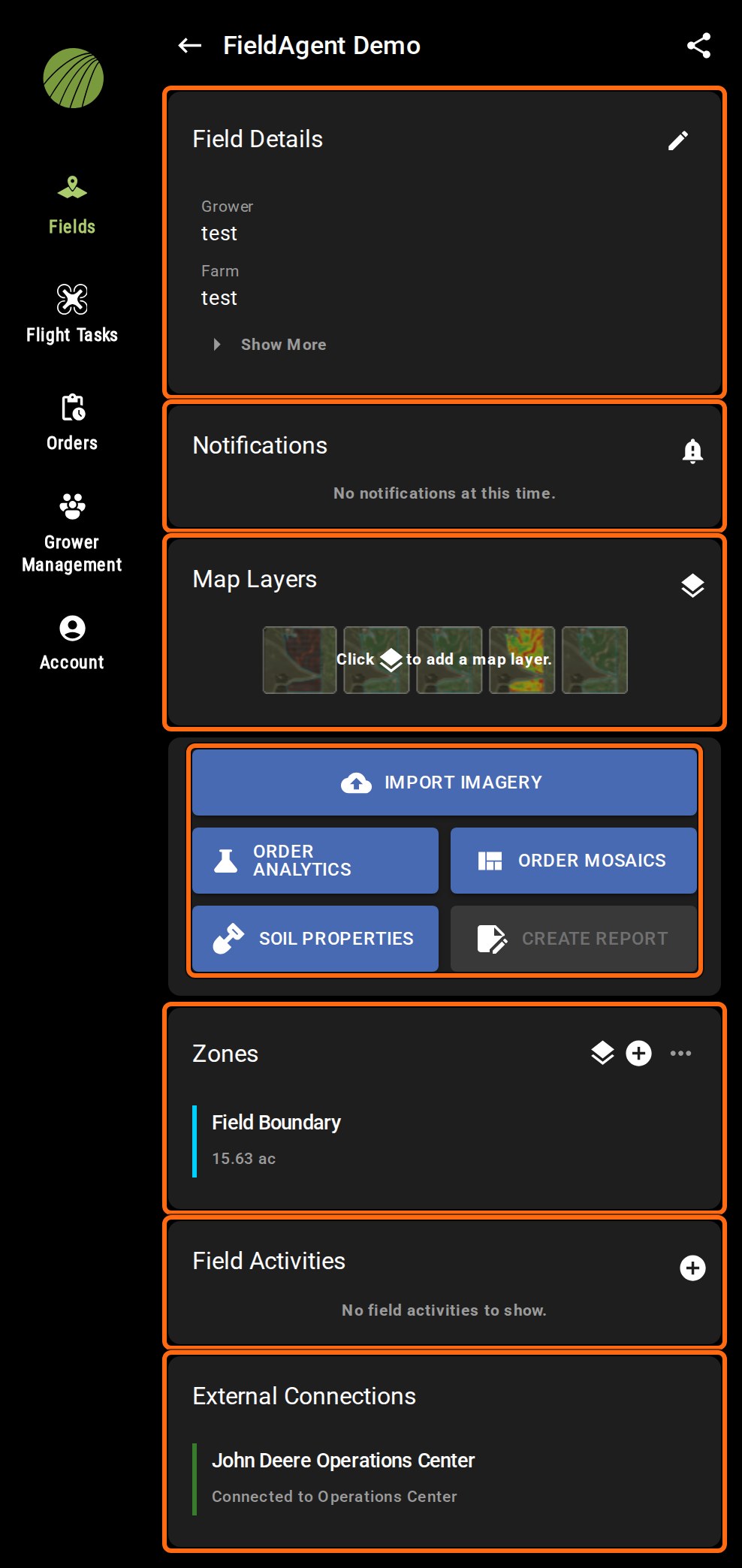
Modules and action buttons highlighted
 returns to the field list. The share icon
  next to the field name shares the field you're in.

 opens the field for editing. |
| **Notifications** | Messages about the field, such as an order that's ready. The icon on a message opens the delivered layer in a new tab. |
| **Map Layers** | Click the layers icon
opens the field for editing. |
| **Notifications** | Messages about the field, such as an order that's ready. The icon on a message opens the delivered layer in a new tab. |
| **Map Layers** | Click the layers icon  to open **Add Map Layers**, and choose the [mosaics and analytic layers](/home/fieldagent-web/view-and-analyze/map-layers.md) to show on the map. |
| **Zones** | The field boundary and the zones you've turned on. The plus icon
to open **Add Map Layers**, and choose the [mosaics and analytic layers](/home/fieldagent-web/view-and-analyze/map-layers.md) to show on the map. |
| **Zones** | The field boundary and the zones you've turned on. The plus icon  draws a new zone, the layers icon chooses which zones show, and the more icon
  downloads them. |
| **Field Activities** | The [crop seasons and activities](/home/fieldagent-web/fields/crop-seasons-and-field-activities.md) recorded for the field. |
| **External Connections** | Shown on a field [imported from John Deere Operations Center](/home/fieldagent-web/integrations/import-fields-from-operations-center.md), with a link to the field in Operations Center. |
### Action buttons
| Button | Description |
| ---------------------------------------------------------------------------------------------------------------------------------------------------------------------------------------------------------------------------------------------------------------------------------------- | ----------------------------------------------------------------------------------------------------------------------------------------- |
|
downloads them. |
| **Field Activities** | The [crop seasons and activities](/home/fieldagent-web/fields/crop-seasons-and-field-activities.md) recorded for the field. |
| **External Connections** | Shown on a field [imported from John Deere Operations Center](/home/fieldagent-web/integrations/import-fields-from-operations-center.md), with a link to the field in Operations Center. |
### Action buttons
| Button | Description |
| ---------------------------------------------------------------------------------------------------------------------------------------------------------------------------------------------------------------------------------------------------------------------------------------- | ----------------------------------------------------------------------------------------------------------------------------------------- |
|  | [Upload photos, a QuickTile or a mosaic](/home/fieldagent-web/imagery/import-imagery-in-fieldagent-web.md) to the field. |
|
| [Upload photos, a QuickTile or a mosaic](/home/fieldagent-web/imagery/import-imagery-in-fieldagent-web.md) to the field. |
|  | [Order a stand count, a tassel count or another analytic](/home/fieldagent-web/ordering/order-analytics.md) from a survey on the field. |
|
| [Order a stand count, a tassel count or another analytic](/home/fieldagent-web/ordering/order-analytics.md) from a survey on the field. |
|  | [Order RGB, crop health, multispectral or elevation mosaics](/home/fieldagent-web/ordering/order-a-mosaic.md) from a survey on the field. |
|
| [Order RGB, crop health, multispectral or elevation mosaics](/home/fieldagent-web/ordering/order-a-mosaic.md) from a survey on the field. |
|  | Soil data for the field, from the public SoilGrids database. |
|
| Soil data for the field, from the public SoilGrids database. |
|  | [Build a PDF report](/home/fieldagent-web/export-and-share/create-a-report.md). The button becomes clickable once a map layer is on. |
***
## Related pages
{% content-ref url="/pages/2trXtXqotc0MLnG2h4uR" %}
[Find a field](/home/fieldagent-web/fields/find-a-field.md)
{% endcontent-ref %}
{% content-ref url="/pages/coc3JMK3CQEMMwBxAaDk" %}
[Create a field](/home/fieldagent-web/fields/create-a-field.md)
{% endcontent-ref %}
{% content-ref url="/pages/iVojQbg4PvArC7gkYtzw" %}
[Share a field](/home/fieldagent-web/fields/share-a-field.md)
{% endcontent-ref %}
{% content-ref url="/pages/hFBVUsKMPfZeBiEZKD2u" %}
[Map layers](/home/fieldagent-web/view-and-analyze/map-layers.md)
{% endcontent-ref %}
{% content-ref url="/pages/IY68sqXuhMPXk6tlYfoF" %}
[Measure a distance or an area](/home/fieldagent-web/view-and-analyze/measure-a-distance-or-an-area.md)
{% endcontent-ref %}
{% content-ref url="/pages/Jgi1Im9DL0dsUKMeiPFH" %}
[Zones and zone statistics](/home/fieldagent-web/view-and-analyze/zones-and-zone-statistics.md)
{% endcontent-ref %}
---
# Agent Instructions
This documentation is published with GitBook. GitBook is the documentation platform designed so that both humans and AI agents can read, navigate, and reason over technical content effectively. Learn more at gitbook.com.
## Querying This Documentation
If you need additional information that is not directly available in this page, you can query the documentation by asking a question.
Perform an HTTP GET request on the following URL with the `ask` and `goal` query parameters:
```
GET https://support.senterasensors.com/home/fieldagent-web/get-started/tour-of-fieldagent-web/fields.md?ask=
| [Build a PDF report](/home/fieldagent-web/export-and-share/create-a-report.md). The button becomes clickable once a map layer is on. |
***
## Related pages
{% content-ref url="/pages/2trXtXqotc0MLnG2h4uR" %}
[Find a field](/home/fieldagent-web/fields/find-a-field.md)
{% endcontent-ref %}
{% content-ref url="/pages/coc3JMK3CQEMMwBxAaDk" %}
[Create a field](/home/fieldagent-web/fields/create-a-field.md)
{% endcontent-ref %}
{% content-ref url="/pages/iVojQbg4PvArC7gkYtzw" %}
[Share a field](/home/fieldagent-web/fields/share-a-field.md)
{% endcontent-ref %}
{% content-ref url="/pages/hFBVUsKMPfZeBiEZKD2u" %}
[Map layers](/home/fieldagent-web/view-and-analyze/map-layers.md)
{% endcontent-ref %}
{% content-ref url="/pages/IY68sqXuhMPXk6tlYfoF" %}
[Measure a distance or an area](/home/fieldagent-web/view-and-analyze/measure-a-distance-or-an-area.md)
{% endcontent-ref %}
{% content-ref url="/pages/Jgi1Im9DL0dsUKMeiPFH" %}
[Zones and zone statistics](/home/fieldagent-web/view-and-analyze/zones-and-zone-statistics.md)
{% endcontent-ref %}
---
# Agent Instructions
This documentation is published with GitBook. GitBook is the documentation platform designed so that both humans and AI agents can read, navigate, and reason over technical content effectively. Learn more at gitbook.com.
## Querying This Documentation
If you need additional information that is not directly available in this page, you can query the documentation by asking a question.
Perform an HTTP GET request on the following URL with the `ask` and `goal` query parameters:
```
GET https://support.senterasensors.com/home/fieldagent-web/get-started/tour-of-fieldagent-web/fields.md?ask=