
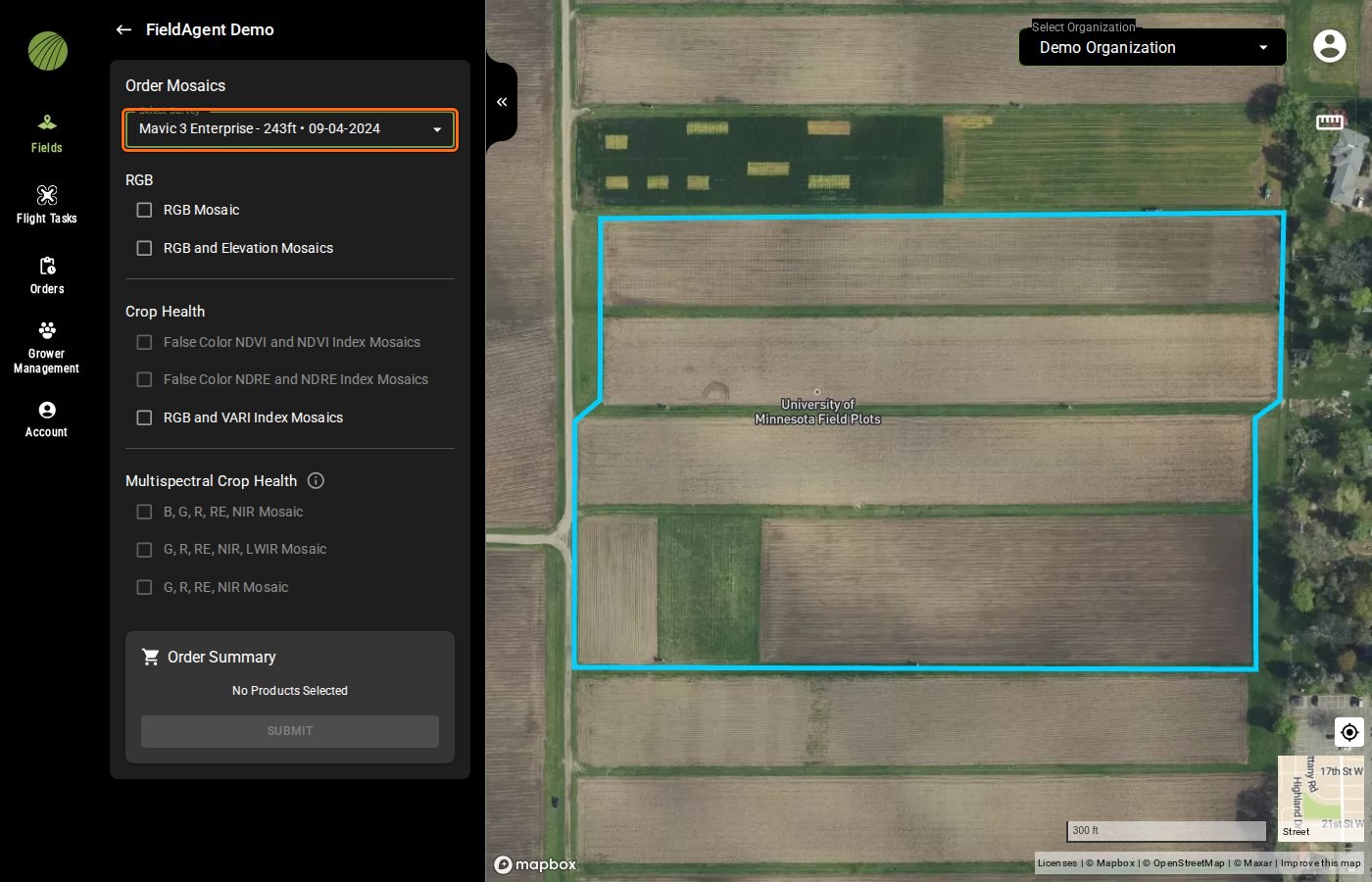
Select Survey highlighted
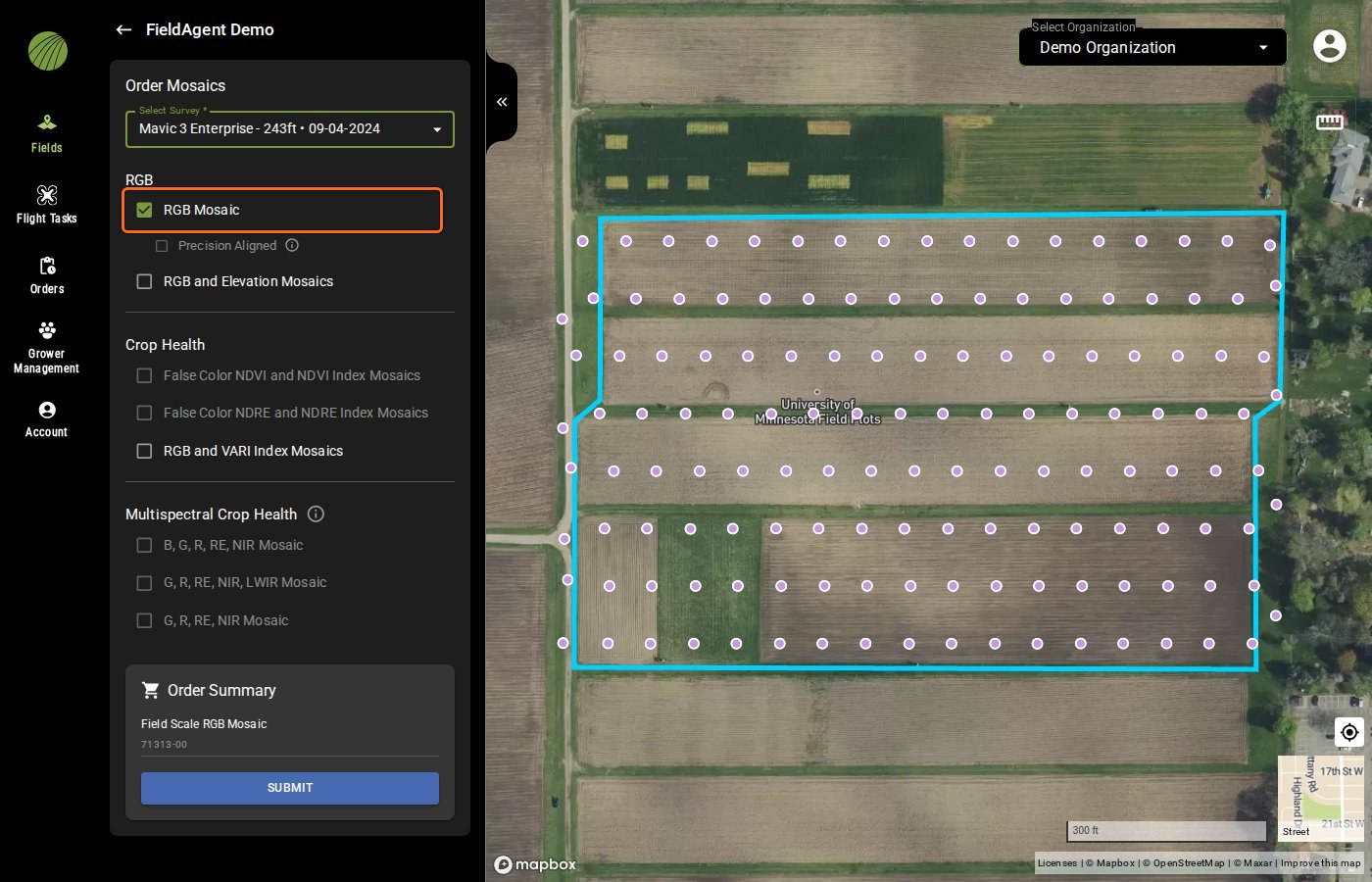
RGB Mosaic highlighted
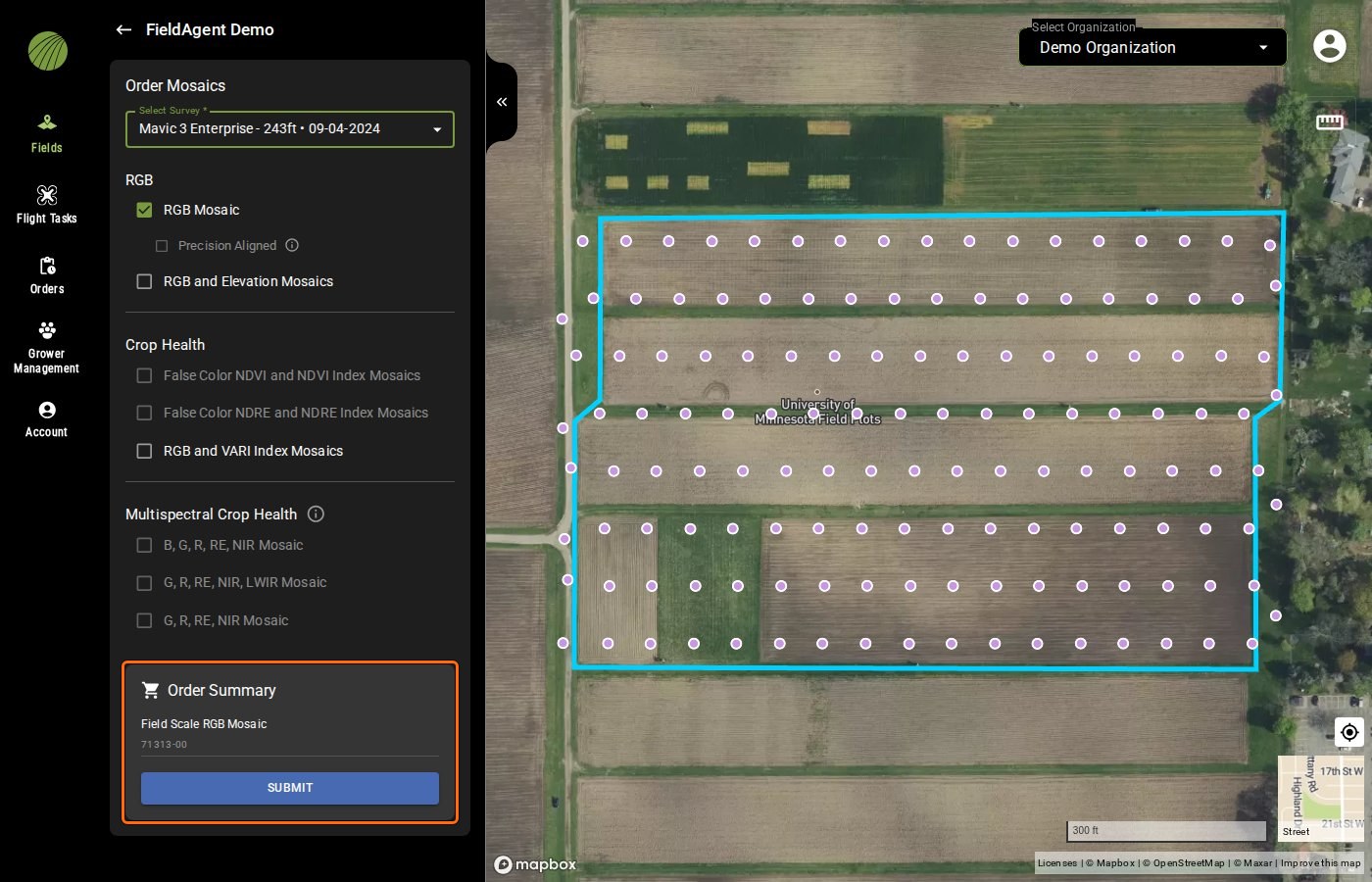
Order Summary highlighted
 {% endstep %}
{% endstepper %}
{% hint style="info" %}
Each order is listed on the **Orders** page with the status **PROCESSING**. Refer to this page to [follow](/home/fieldagent-web/ordering/orders-and-flight-tasks.md) your order's progress.
When the mosaic is ready, FieldAgent adds it to the field under the survey's date and emails you.
{% endhint %}
### Try it in the demo
In the demo below, order an RGB mosaic from a sample field's survey and find the order on the **Orders** page.
{% @fieldagent-demo/embed content="order-mosaic" %}
Open this demo full size
***
## If the order fails
An order [fails](/home/fieldagent-web/ordering/why-cant-i-order.md#the-order-failed) when the photos can't be stitched. FieldAgent emails you with a subject such as "Your Crop Health Mosaic for the … organization failed to process".
The usual cause is photo overlap below the mosaic specification. A survey flown for a stand count or canopy cover analytic is a common example, because its photos don't have any overlap.
{% hint style="warning" %}
Fly the field again to the mosaic's [flight specification](https://catalog.sentera.com/products), then order from the new survey. Ordering again on the same survey won't help.
{% endhint %}
***
## Related pages
{% content-ref url="/pages/SWLgKh4AXplziFjDD5I5" %}
[Mosaics](/home/fieldagent-web/imagery/mosaics.md)
{% endcontent-ref %}
{% content-ref url="/pages/F4kkbkAVmnxgSw49MBqt" %}
[Crop Health and Multispectral mosaics](/home/fieldagent-web/analytics/crop-health-mosaics.md)
{% endcontent-ref %}
{% content-ref url="/pages/QyR3X5dnMs7tgzp5C76L" %}
[Elevation Mosaic](/home/fieldagent-web/analytics/elevation-mosaic.md)
{% endcontent-ref %}
{% content-ref url="/pages/2WsqwOiougiTw8Hpg5Ig" %}
[Why can't I order?](/home/fieldagent-web/ordering/why-cant-i-order.md)
{% endcontent-ref %}
{% content-ref url="/pages/hFBVUsKMPfZeBiEZKD2u" %}
[Map layers](/home/fieldagent-web/view-and-analyze/map-layers.md)
{% endcontent-ref %}
---
# Agent Instructions
This documentation is published with GitBook. GitBook is the documentation platform designed so that both humans and AI agents can read, navigate, and reason over technical content effectively. Learn more at gitbook.com.
## Querying This Documentation
If you need additional information that is not directly available in this page, you can query the documentation by asking a question.
Perform an HTTP GET request on the following URL with the `ask` and `goal` query parameters:
```
GET https://support.senterasensors.com/home/fieldagent-web/ordering/order-a-mosaic.md?ask=
{% endstep %}
{% endstepper %}
{% hint style="info" %}
Each order is listed on the **Orders** page with the status **PROCESSING**. Refer to this page to [follow](/home/fieldagent-web/ordering/orders-and-flight-tasks.md) your order's progress.
When the mosaic is ready, FieldAgent adds it to the field under the survey's date and emails you.
{% endhint %}
### Try it in the demo
In the demo below, order an RGB mosaic from a sample field's survey and find the order on the **Orders** page.
{% @fieldagent-demo/embed content="order-mosaic" %}
Open this demo full size
***
## If the order fails
An order [fails](/home/fieldagent-web/ordering/why-cant-i-order.md#the-order-failed) when the photos can't be stitched. FieldAgent emails you with a subject such as "Your Crop Health Mosaic for the … organization failed to process".
The usual cause is photo overlap below the mosaic specification. A survey flown for a stand count or canopy cover analytic is a common example, because its photos don't have any overlap.
{% hint style="warning" %}
Fly the field again to the mosaic's [flight specification](https://catalog.sentera.com/products), then order from the new survey. Ordering again on the same survey won't help.
{% endhint %}
***
## Related pages
{% content-ref url="/pages/SWLgKh4AXplziFjDD5I5" %}
[Mosaics](/home/fieldagent-web/imagery/mosaics.md)
{% endcontent-ref %}
{% content-ref url="/pages/F4kkbkAVmnxgSw49MBqt" %}
[Crop Health and Multispectral mosaics](/home/fieldagent-web/analytics/crop-health-mosaics.md)
{% endcontent-ref %}
{% content-ref url="/pages/QyR3X5dnMs7tgzp5C76L" %}
[Elevation Mosaic](/home/fieldagent-web/analytics/elevation-mosaic.md)
{% endcontent-ref %}
{% content-ref url="/pages/2WsqwOiougiTw8Hpg5Ig" %}
[Why can't I order?](/home/fieldagent-web/ordering/why-cant-i-order.md)
{% endcontent-ref %}
{% content-ref url="/pages/hFBVUsKMPfZeBiEZKD2u" %}
[Map layers](/home/fieldagent-web/view-and-analyze/map-layers.md)
{% endcontent-ref %}
---
# Agent Instructions
This documentation is published with GitBook. GitBook is the documentation platform designed so that both humans and AI agents can read, navigate, and reason over technical content effectively. Learn more at gitbook.com.
## Querying This Documentation
If you need additional information that is not directly available in this page, you can query the documentation by asking a question.
Perform an HTTP GET request on the following URL with the `ask` and `goal` query parameters:
```
GET https://support.senterasensors.com/home/fieldagent-web/ordering/order-a-mosaic.md?ask=