> For the complete documentation index, see [llms.txt](https://support.senterasensors.com/rtk-ppk-module/llms.txt). Markdown versions of documentation pages are available by appending `.md` to page URLs; this page is available as [Markdown](https://support.senterasensors.com/rtk-ppk-module/whats-in-the-box/if1200.md).

# IF1200

## RTK-PPK Kit

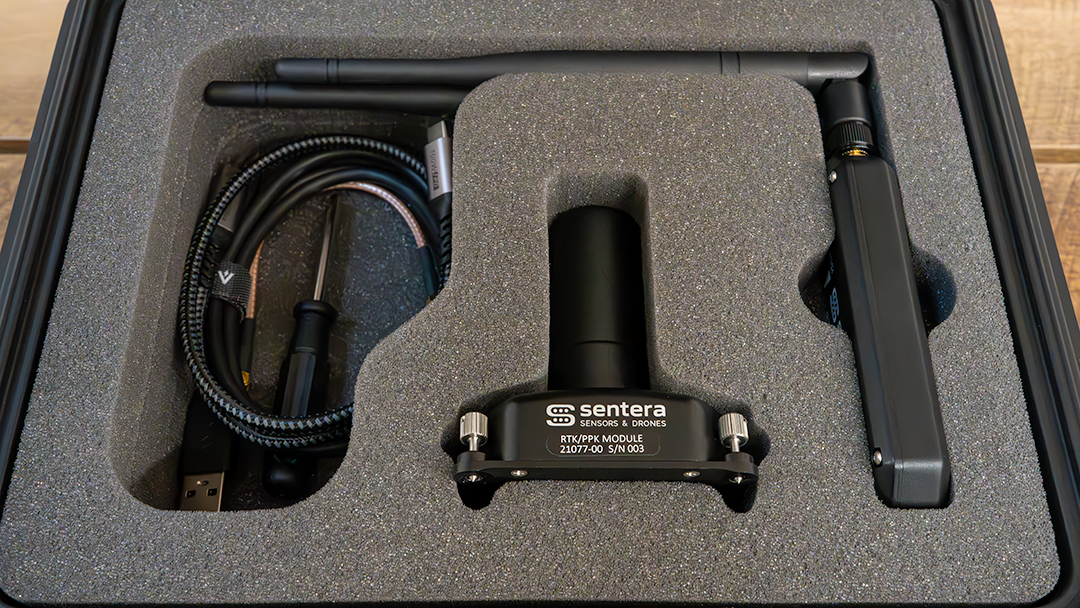
<figure><img src="https://880432523-files.gitbook.io/~/files/v0/b/gitbook-x-prod.appspot.com/o/spaces%2FZVOsw5zLqTIEr4ErRyeO%2Fuploads%2Fw7MK7g1FeawEePTTeoR0%2Fbox%20contents.png?alt=media&amp;token=a2638ce6-4e51-47bf-b632-c2d6b9c64e84" alt=""><figcaption></figcaption></figure>

## What Is Included

<table data-view="cards"><thead><tr><th></th><th></th><th data-hidden data-card-cover data-type="image">Cover image</th></tr></thead><tbody><tr><td>RTK/PPK Module</td><td>The module contains the GNSS receiver, GNSS antenna, and integrated 915 MHz radio. This is the piece of hardware that allows for the RTK/PPK functionality.</td><td><a href="https://880432523-files.gitbook.io/~/files/v0/b/gitbook-x-prod.appspot.com/o/spaces%2FZVOsw5zLqTIEr4ErRyeO%2Fuploads%2FfOGGHNWtG48bb5jtsLZB%2Fmodule%20cropped.jpg?alt=media&amp;token=df8c23c8-65e3-4740-a006-7f9af83b436b">module cropped.jpg</a></td></tr><tr><td>Sentera Ground Radio</td><td><p>The ground radio is used when the user wants to receive RTK corrections from a 3rd party base station or other corrections source that is not the NTRIP client built into the hand controller.</p><p>This radio is connected to other devices via USB.</p></td><td><a href="https://880432523-files.gitbook.io/~/files/v0/b/gitbook-x-prod.appspot.com/o/spaces%2FZVOsw5zLqTIEr4ErRyeO%2Fuploads%2FuQw26mWtMqo1Fxok5pp3%2Fground%20radio%20and%20seperate%20antenna%20cropped.jpg?alt=media&amp;token=ed6cab0a-d2d5-46f9-825b-ca311c41306b">ground radio and seperate antenna cropped.jpg</a></td></tr><tr><td>915 MHz Antenna</td><td><p>The 915 MHz is used when using the ground radio to receive RTK corrections. It is not needed when the ground radio is not being used. </p><p>For IF800 the antenna is connected to the coax pass through on the underside of the aircraft.</p></td><td><a href="https://880432523-files.gitbook.io/~/files/v0/b/gitbook-x-prod.appspot.com/o/spaces%2FZVOsw5zLqTIEr4ErRyeO%2Fuploads%2FYrwiS7NnTzvT00ahxrjJ%2Fantenna%20shadowless%202.jpg?alt=media&amp;token=4c9edcee-9486-4845-ae5e-e33d5463e029">antenna shadowless 2.jpg</a></td></tr><tr><td>IF1200 915MHz Antenna Mount and MCX to SMA Coax Cable</td><td>This is an RF coax cable and rail mount. It is used to connect the 915MHz antenna to the radio in the module.</td><td><a href="https://880432523-files.gitbook.io/~/files/v0/b/gitbook-x-prod.appspot.com/o/spaces%2FZVOsw5zLqTIEr4ErRyeO%2Fuploads%2FKHLDoRtUJFfAVHz609DR%2Fif1200%20coax.jpg?alt=media&amp;token=c8c07e0b-0144-4b25-857b-9db8ea29b2f1">if1200 coax.jpg</a></td></tr><tr><td>USB-C to USB-C Cable, 3ft</td><td><p>This cable is used to connect the module to the sensor.</p><p>This will power the module and send data back and forth between the sensor and the module.</p></td><td><a href="https://880432523-files.gitbook.io/~/files/v0/b/gitbook-x-prod.appspot.com/o/spaces%2FZVOsw5zLqTIEr4ErRyeO%2Fuploads%2FbWsiQTJ0E7kB3I18irQB%2Fusb%20c%20to%20usb%20c.jpg?alt=media&amp;token=0b4dc6ee-b4c5-428c-b354-db46d3c07154">usb c to usb c.jpg</a></td></tr><tr><td>USB-A to USB-C Cable</td><td><p>This cable is provided with the intent of being used to connect the ground radio to either a base station or a laptop.</p><p>Some devices (base stations or laptops) may require a USB-C to USB-C or other such cable depending on the available I/O of the device.</p></td><td><a href="https://880432523-files.gitbook.io/~/files/v0/b/gitbook-x-prod.appspot.com/o/spaces%2FZVOsw5zLqTIEr4ErRyeO%2Fuploads%2F4PqBaFaBmZJzW73hM3OK%2Fusb%20to%20usb%20c.jpg?alt=media&amp;token=e2a50557-fe7d-47f7-9991-f0e2ee4d1387">usb to usb c.jpg</a></td></tr><tr><td>Right Angle USB-C to USB-A Cable, 6in</td><td><p>This cable is only used when operating with a 6X sensor.</p><p>It is used to connect the incident light sensor to to the module.</p></td><td><a href="https://880432523-files.gitbook.io/~/files/v0/b/gitbook-x-prod.appspot.com/o/spaces%2FZVOsw5zLqTIEr4ErRyeO%2Fuploads%2F890A77PqwC0G5vA7YsWb%2Fright%20angle%20usb%20to%20c%20second%20pic.jpg?alt=media&amp;token=f718f108-b9c9-4316-9558-8beb5248317c">right angle usb to c second pic.jpg</a></td></tr><tr><td>Aircraft Side Cable Clip - QTY2</td><td><p>This clip is used to secure the USB-C to USB-C cable that connects the module to the sensor. It helps ensure that a loose cable cannot get into the props during flight</p><p>This clip is permanently installed on to the aircraft using an adhesive backing. </p></td><td><a href="https://880432523-files.gitbook.io/~/files/v0/b/gitbook-x-prod.appspot.com/o/spaces%2FZVOsw5zLqTIEr4ErRyeO%2Fuploads%2FyYFOprNNfTDNBunXcfNh%2Fcable%20clip%20shadowless%20v2.jpg?alt=media&amp;token=695d3ed9-8cba-4772-b09c-bf62abdaf4aa">cable clip shadowless v2.jpg</a></td></tr><tr><td>Alcohol Wipe</td><td>This is provided with the kit to clean the surface of the aircraft before installing the adhesive clip.</td><td><a href="https://880432523-files.gitbook.io/~/files/v0/b/gitbook-x-prod.appspot.com/o/spaces%2FZVOsw5zLqTIEr4ErRyeO%2Fuploads%2FytYxheDZ1MRzZ374R9xM%2Fwipe.jpg?alt=media&amp;token=0ce5036a-7b5e-4506-9914-521f02e917fe">wipe.jpg</a></td></tr><tr><td>Aircraft Leg Cable Clip - QTY 2</td><td><p>This clip is used to secure the USB-C to USB-C cable that connects the module to the sensor.</p><p>This clip captures the cable and is clipped onto the leg of the aircraft.</p><p>It helps ensure that a loose cable cannot get into the props during flight</p></td><td><a href="https://880432523-files.gitbook.io/~/files/v0/b/gitbook-x-prod.appspot.com/o/spaces%2FZVOsw5zLqTIEr4ErRyeO%2Fuploads%2Fu7wTyPahrWAYTssC4HJm%2Fleg%20cable%20clip%20shadowless%20cropped.jpg?alt=media&amp;token=cf5169b7-5571-4e62-ba50-464408baebbf">leg cable clip shadowless cropped.jpg</a></td></tr><tr><td>6X Dual Mount</td><td><p>This mount is only used when operating with a 6X sensor.</p><p>It holds both the module and the incident light sensor.</p><p>This needs to be used anytime a 6X is used with this system as it places the module in the correct spot for lever arm offset calculations</p><p><strong>This mount is manufactured by IFT and comes in separate packaging from the rest of the kit.</strong></p></td><td><a href="https://880432523-files.gitbook.io/~/files/v0/b/gitbook-x-prod.appspot.com/o/spaces%2FZVOsw5zLqTIEr4ErRyeO%2Fuploads%2FTILSBSDoYvxMbhesYayO%2Fdual%20mount.jpg?alt=media&amp;token=a0420598-c451-4403-be37-42f3de54e321">dual mount.jpg</a></td></tr><tr><td>Hex Driver, 3mm</td><td>This is a hex driver provided to adjust the screw on the rail mount for the RF cable. </td><td><a href="https://880432523-files.gitbook.io/~/files/v0/b/gitbook-x-prod.appspot.com/o/spaces%2FZVOsw5zLqTIEr4ErRyeO%2Fuploads%2F1kpGSW1szJVM6RHAtGuT%2Fhex%20key.jpg?alt=media&amp;token=d79bb6b3-8d11-434e-bcd9-0b6e5bd5a821">hex key.jpg</a></td></tr><tr><td>Flat Head Screw Driver</td><td>This is used to secure the RTK PPK Module to the aircraft. </td><td><a href="https://880432523-files.gitbook.io/~/files/v0/b/gitbook-x-prod.appspot.com/o/spaces%2FZVOsw5zLqTIEr4ErRyeO%2Fuploads%2FFYWIkFpMPkiirANcdmVX%2Fflathead.jpg?alt=media&amp;token=d982a2f6-9df4-4985-a488-6872744f8398">flathead.jpg</a></td></tr></tbody></table>

{% hint style="info" %}
The Sentera Ground Radio is used for connecting 3rd party RTK base stations to the RTK/PPK Module.
{% endhint %}
