> For the complete documentation index, see [llms.txt](https://support.senterasensors.com/home/llms.txt). Markdown versions of documentation pages are available by appending `.md` to page URLs; this page is available as [Markdown](https://support.senterasensors.com/home/fieldagent-web/imagery/mosaics.md).

# Mosaics

See why a stitched mosaic beats the QuickTile and which mosaics you can order with your sensor.

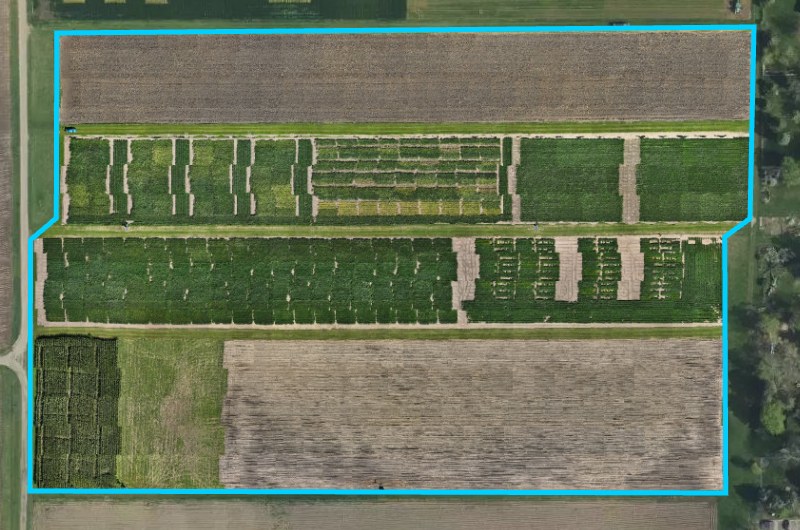
A mosaic gives you one accurate image of the whole field, stitched from the photos of a survey. [Order it](/home/fieldagent-web/ordering/order-a-mosaic.md) from a survey you've imported, and it's added to the field as a map layer.

***

## Why order a mosaic

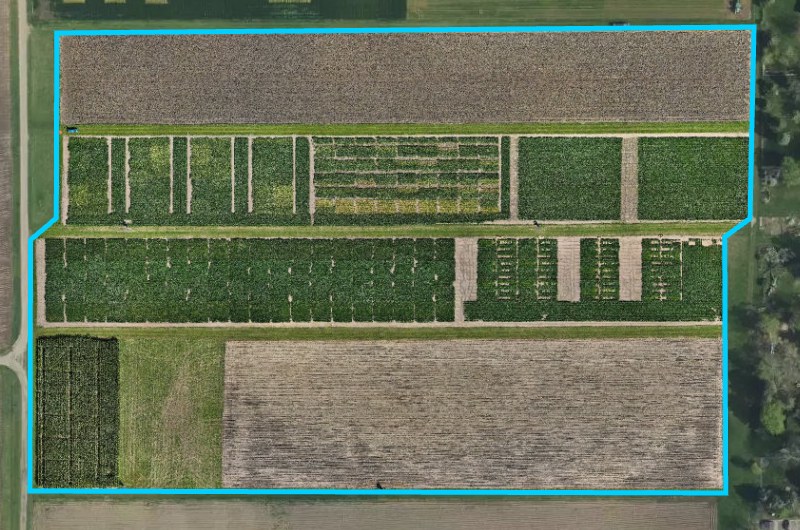
Stitching compares every photo with its neighbors, positions them accurately and combines them into a single image. The mosaic is one continuous image of the field, making features that span several photos easy to see and understand.

Order a mosaic when you want to:

* compare NDVI or NDRE across the whole field
* see zone statistics or write a prescription
* colorize the imagery by index or band
* download one georeferenced image of the field as a GeoTIFF
* measure elevation, with an Elevation Mosaic

{% columns %}
{% column %}

<figure><img src="https://2791052504-files.gitbook.io/~/files/v0/b/gitbook-x-prod.appspot.com/o/spaces%2FVt6flh3S4tohPAjrSP91%2Fuploads%2Fgit-blob-52220cc96a46955cda2262fdfec2cf5b63e4055d%2Ffa-web-layer-quicktile-rgb.jpg?alt=media" alt="The demo field under a QuickTile RGB (DJI) layer: photos placed where they were taken"><figcaption><p>QuickTile RGB. Look for the seams between photos.</p></figcaption></figure>
{% endcolumn %}

{% column %}

<figure><img src="https://2791052504-files.gitbook.io/~/files/v0/b/gitbook-x-prod.appspot.com/o/spaces%2FVt6flh3S4tohPAjrSP91%2Fuploads%2Fgit-blob-7dfb5c7bac19a602b1a74fdcc7ed8a1b39d02312%2Ffa-web-layer-rgb-mosaic.jpg?alt=media" alt="The demo field under an RGB Mosaic: one continuous stitched image"><figcaption><p>RGB Mosaic of the same flight.</p></figcaption></figure>
{% endcolumn %}
{% endcolumns %}

***

## Choose the right product

The [products you can order](https://catalog.sentera.com/products) depend on the bands in the photos you imported.

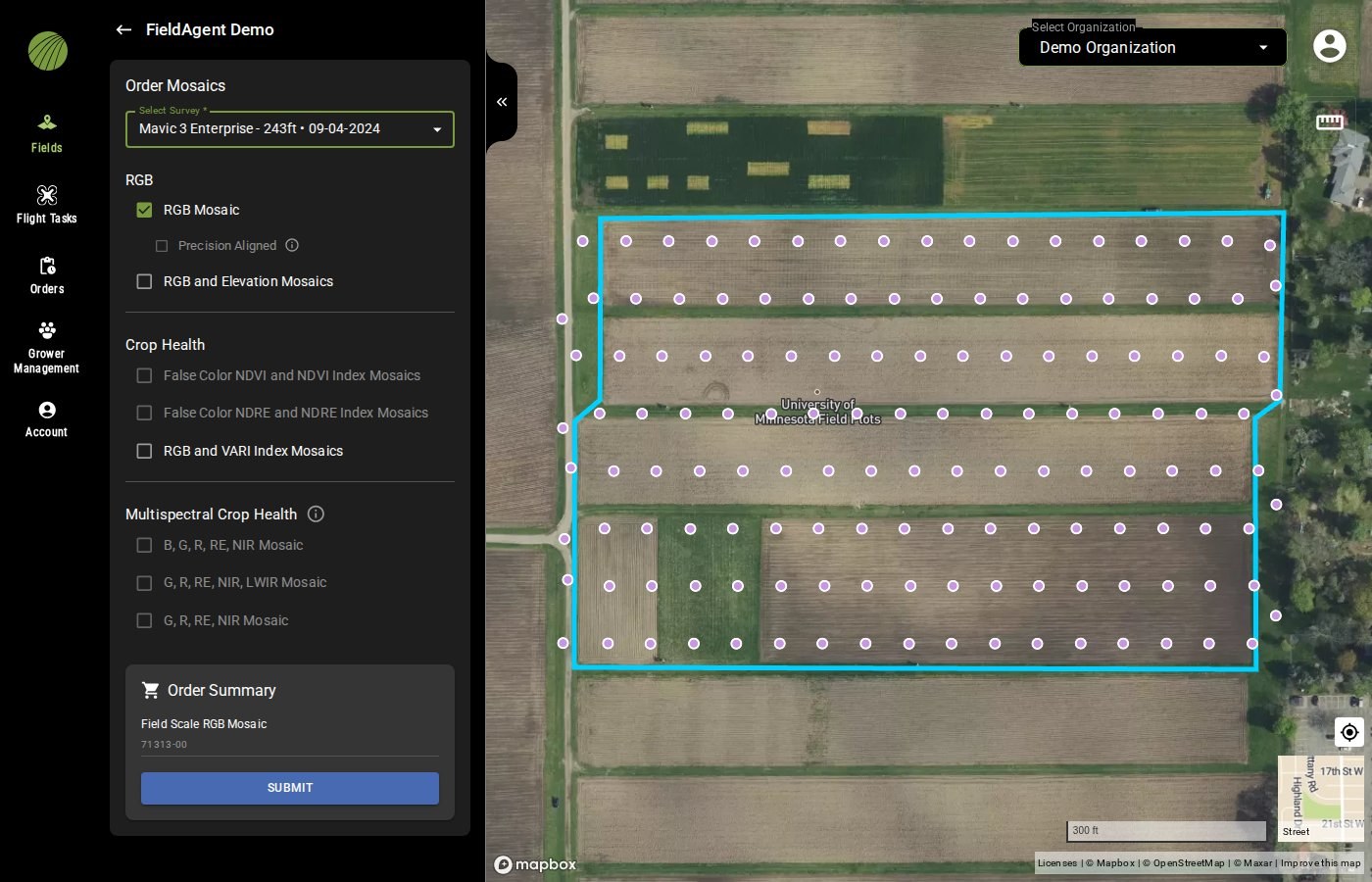
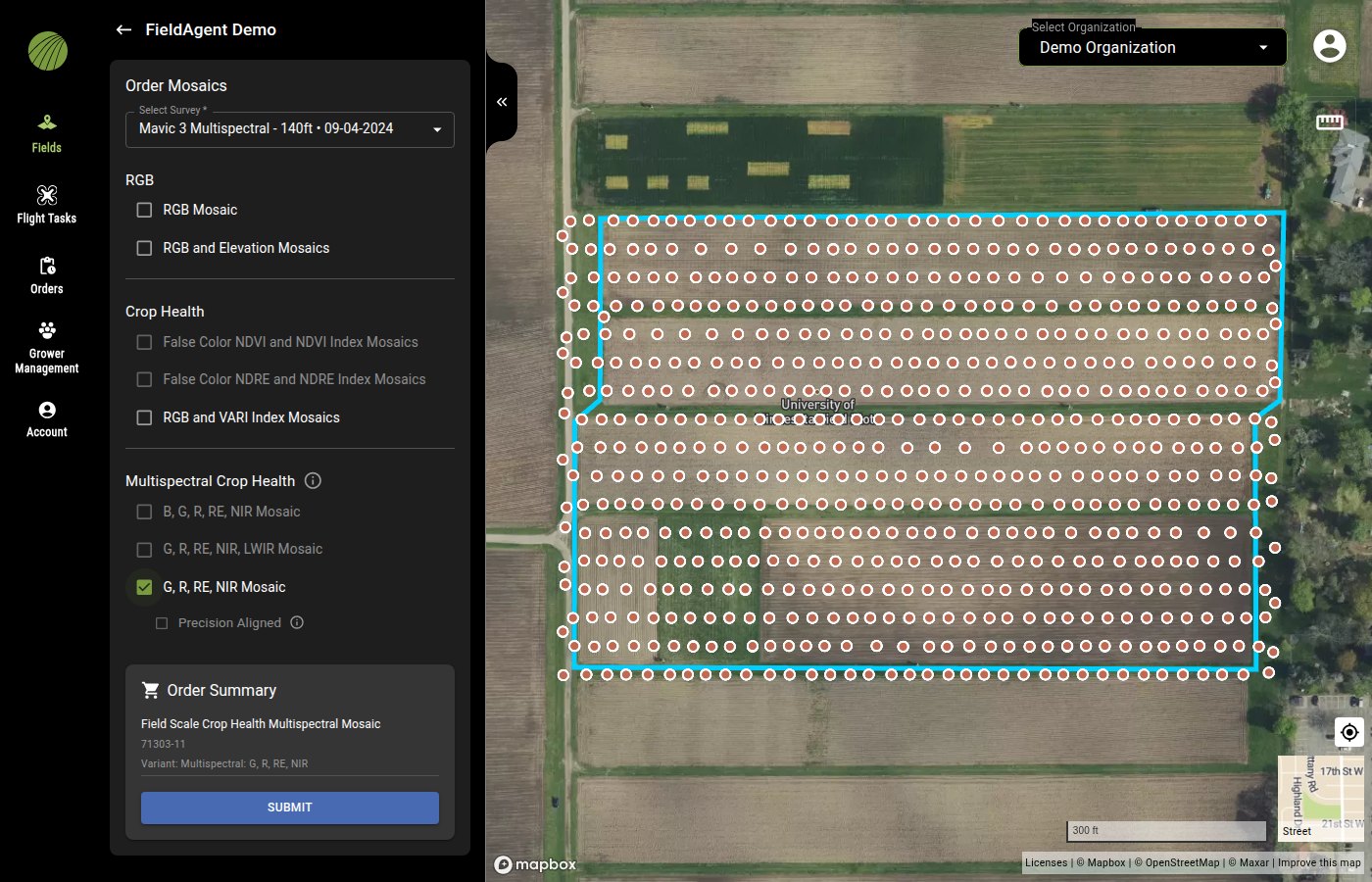
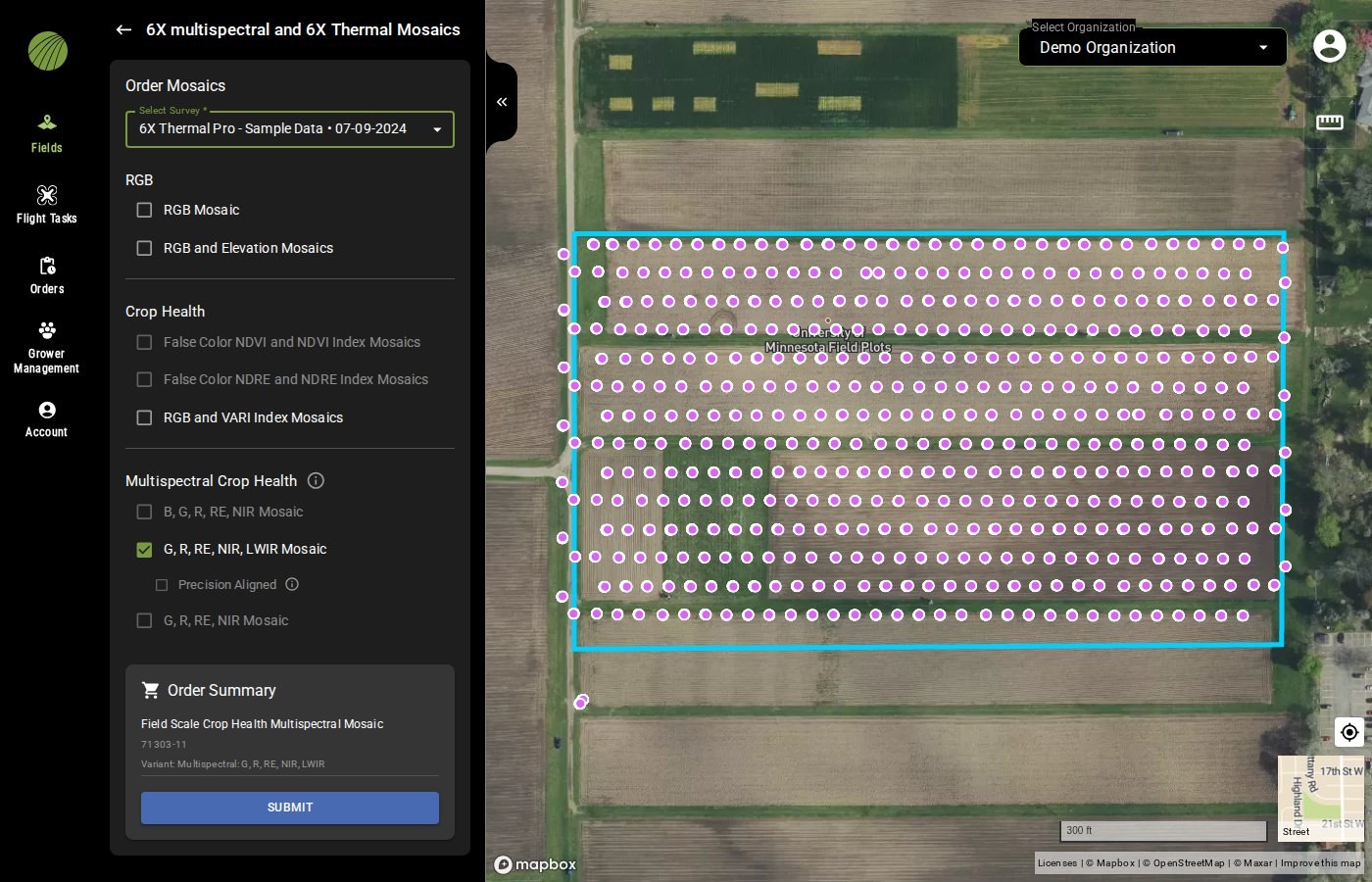
* The **Multispectral Crop Health** products need the matching multispectral bands. Each sensor's band set turns on only its own product.
* **False Color NDVI and NDVI Index Mosaics** needs red and near-infrared bands. **False Color NDRE and NDRE Index Mosaics** needs red-edge and near-infrared bands.
* A 6X or Mavic 3 Multispectral survey leaves these two grayed out and turns on its **Multispectral Crop Health** product instead. Order that, then show NDVI or NDRE in [Visualization](/home/fieldagent-web/analytics/crop-health-mosaics.md#show-an-index-or-band).
* If you imported only the RGB photos of a multispectral camera, such as a Mavic 3 Multispectral, the survey counts as RGB. Import its multispectral photos to enable other products.

{% hint style="warning" %}
With an RGB-only camera, such as the Phantom 4 Pro, Mavic 2 Pro or Mavic 3 Enterprise, the only crop health mosaic you can order is **RGB and VARI Index Mosaics**. VARI is a less sensitive estimate from visible light, not NDVI. For NDVI or NDRE, use sensors with a near-infrared or red edge band.
{% endhint %}

{% tabs %}
{% tab title="RGB survey" %}

<figure><img src="https://2791052504-files.gitbook.io/~/files/v0/b/gitbook-x-prod.appspot.com/o/spaces%2FVt6flh3S4tohPAjrSP91%2Fuploads%2Fgit-blob-85c1ef6e3c1b4d2d9af92f3f9a410bf0621e4580%2Ffa-web-order-mosaics-products.jpg?alt=media" alt="The Order Mosaics panel for a Mavic 3 Enterprise survey of 09-04-2024: RGB Mosaic checked with a Precision Aligned option, RGB and Elevation Mosaics and RGB and VARI Index Mosaics enabled, the False Color NDVI, False Color NDRE and Multispectral Crop Health products grayed out, and the Order Summary showing Field Scale RGB Mosaic 71313-00; the survey&#x27;s photo dots cover the field on the map"><figcaption><p>With RGB photos only, the multispectral products are grayed out.</p></figcaption></figure>
{% endtab %}

{% tab title="Mavic 3 Multispectral" %}

<figure><img src="https://2791052504-files.gitbook.io/~/files/v0/b/gitbook-x-prod.appspot.com/o/spaces%2FVt6flh3S4tohPAjrSP91%2Fuploads%2Fgit-blob-06abd0741cce4b2f8382d8d36274d432560a50b8%2Ffa-web-order-mosaics-multispectral.jpg?alt=media" alt="The Order Mosaics panel for a Mavic 3 Multispectral survey with G, R, RE, NIR Mosaic checked under Multispectral Crop Health, the B, G, R, RE, NIR and G, R, RE, NIR, LWIR products grayed out, and the Order Summary showing Field Scale Crop Health Multispectral Mosaic 71303-11 Variant: Multispectral: G, R, RE, NIR above the SUBMIT button; the survey&#x27;s photo dots cover the field on the map"><figcaption></figcaption></figure>
{% endtab %}

{% tab title="6X Thermal Pro" %}

<figure><img src="https://2791052504-files.gitbook.io/~/files/v0/b/gitbook-x-prod.appspot.com/o/spaces%2FVt6flh3S4tohPAjrSP91%2Fuploads%2Fgit-blob-4ff08be3013e07cee9b34da2d00fc51e682c5618%2Ffa-web-order-mosaics-6x-thermal.jpg?alt=media" alt="The Order Mosaics panel for a Sentera 6X Thermal Pro survey of 07-09-2024 with G, R, RE, NIR, LWIR Mosaic checked: RGB Mosaic, RGB and Elevation Mosaics and RGB and VARI Index Mosaics are enabled; False Color NDVI, False Color NDRE, B, G, R, RE, NIR Mosaic and G, R, RE, NIR Mosaic are grayed out; the Order Summary shows Field Scale Crop Health Multispectral Mosaic 71303-11, and the survey&#x27;s photo dots cover the field on the map"><figcaption><p>Only G, R, RE, NIR, LWIR is enabled under Multispectral Crop Health.</p></figcaption></figure>
{% endtab %}
{% endtabs %}

<table><thead><tr><th width="118">Group</th><th width="210">Product</th><th>Order Summary shows</th><th>Description</th></tr></thead><tbody><tr><td><strong>RGB</strong></td><td><strong>RGB Mosaic</strong></td><td>Field Scale RGB Mosaic 71313-00</td><td>A true-color mosaic.</td></tr><tr><td><strong>RGB</strong></td><td><strong>RGB and Elevation Mosaics</strong></td><td>Elevation Map 71309-02</td><td>An <strong>RGB Mosaic</strong> and an <a href="/home/fieldagent-web/analytics/elevation-mosaic.md">Elevation Mosaic</a>, a digital surface model.</td></tr><tr><td><strong>Crop Health</strong></td><td><strong>False Color NDVI and NDVI Index Mosaics</strong></td><td>Field Scale Crop Health Mosaic 71303-00, Variant: NDVI</td><td>A <strong>Crop Health Mosaic</strong> colorized by NDVI. Needs a sensor with red and near-infrared bands.</td></tr><tr><td><strong>Crop Health</strong></td><td><strong>False Color NDRE and NDRE Index Mosaics</strong></td><td>Field Scale Crop Health Mosaic 71303-00, Variant: NDRE</td><td>A <strong>Crop Health Mosaic</strong> colorized by NDRE. Needs a sensor with red-edge and near-infrared bands.</td></tr><tr><td><strong>Crop Health</strong></td><td><strong>RGB and VARI Index Mosaics</strong></td><td>Field Scale Crop Health Mosaic 71303-00, Variant: VARI</td><td>An <strong>RGB Mosaic</strong> and a VARI <strong>Crop Health Mosaic</strong> computed from it. Works with RGB-only cameras.</td></tr><tr><td><strong>Multispectral Crop Health</strong></td><td><strong>B, G, R, RE, NIR Mosaic</strong>, <strong>G, R, RE, NIR, LWIR Mosaic</strong> or <strong>G, R, RE, NIR Mosaic</strong></td><td>Field Scale Crop Health Multispectral Mosaic 71303-11, Variant: Multispectral: followed by the band list, for example G, R, RE, NIR</td><td>A <strong>Multispectral Mosaic</strong>. You choose which bands and <a href="/home/fieldagent-web/analytics/crop-health-mosaics.md">indices</a> to show when you view it. With LWIR it includes the thermal band in degrees Celsius.</td></tr></tbody></table>

{% hint style="info" %}
In the band lists, B, G, R, RE, NIR and LWIR stand for blue, green, red, red edge, near infrared and long-wave infrared (thermal).
{% endhint %}

The Scout, Advisor and Advanced [plans](https://sentera.com/fieldagent/#FieldAgentPkgsTable) all include these products.

***

## Order and view a mosaic

Open the field and use the Order Mosaics button, then [choose the survey and products](/home/fieldagent-web/ordering/order-a-mosaic.md#order-the-mosaic).

<div align="center"><img src="https://2791052504-files.gitbook.io/~/files/v0/b/gitbook-x-prod.appspot.com/o/spaces%2FVt6flh3S4tohPAjrSP91%2Fuploads%2Fgit-blob-c3d501a796e1ab4f1f6440dc4ee731afa45fe1f0%2Ffa-web-ui-btn-order-mosaics-1x.png?alt=media" alt="ORDER MOSAICS button"></div>

{% hint style="warning" %}
A mosaic needs a high overlap between photos. Imagery flown only for a QuickTile, or for a spot-scout analytic, may not have enough. Fly to the [flight specification](#flight-specification) of the mosaic you order.
{% endhint %}

FieldAgent emails you when the mosaic is ready. It appears in **Add Map Layers** as RGB Mosaic, [Multispectral Mosaic](/home/fieldagent-web/analytics/crop-health-mosaics.md#show-an-index-or-band), [Elevation Mosaic](/home/fieldagent-web/analytics/elevation-mosaic.md) or a [crop health mosaic](/home/fieldagent-web/analytics/crop-health-mosaics.md).

***

## Flight specification

Pick your sensor in **Settings for** to see how to fly for an RGB Mosaic. The [Elevation Mosaic](/home/fieldagent-web/analytics/elevation-mosaic.md#flight-specification) and the [crop health and multispectral mosaics](/home/fieldagent-web/analytics/crop-health-mosaics.md#flight-specification) have their own.

{% @sentera-analytics-finder/finder content="audience=support\&view=spec\&product=rgb-mosaic" %}

***

## Related pages

{% content-ref url="/pages/3AZV1F3eNcUzaVTotJPN" %}
[Order a mosaic](/home/fieldagent-web/ordering/order-a-mosaic.md)
{% endcontent-ref %}

{% content-ref url="/pages/eQGd3VrN2PYe1llqeR5h" %}
[Import imagery in FieldAgent Web](/home/fieldagent-web/imagery/import-imagery-in-fieldagent-web.md)
{% endcontent-ref %}

{% content-ref url="/pages/F4kkbkAVmnxgSw49MBqt" %}
[Crop Health and Multispectral mosaics](/home/fieldagent-web/analytics/crop-health-mosaics.md)
{% endcontent-ref %}

{% content-ref url="/pages/QyR3X5dnMs7tgzp5C76L" %}
[Elevation Mosaic](/home/fieldagent-web/analytics/elevation-mosaic.md)
{% endcontent-ref %}


---

# Agent Instructions
This documentation is published with GitBook. GitBook is the documentation platform designed so that both humans and AI agents can read, navigate, and reason over technical content effectively. Learn more at gitbook.com.

## Querying This Documentation
If you need additional information that is not directly available in this page, you can query the documentation by asking a question.

Perform an HTTP GET request on the following URL with the `ask` and `goal` query parameters:

```
GET https://support.senterasensors.com/home/fieldagent-web/imagery/mosaics.md?ask=<question>&goal=<user_goal>
```

`ask` is the immediate question: it should be specific, self-contained, and written in natural language.
`goal` is what the user is ultimately trying to achieve, the reason they need the answer. Sharing it helps GitBook give you a better, more relevant answer. A goal is most helpful when it describes the outcome the user wants rather than restating the question. For example, with `ask=how do I create an API token`, a goal like `automate deployments from our CI pipeline` lets GitBook tailor the answer to that use case.

The response will contain a direct answer to the question and relevant excerpts and sources from the documentation.

Use this mechanism when the answer is not explicitly present in the current page, you need clarification or additional context, or you want to retrieve related documentation sections.